Showing posts with label geometry. Show all posts

Thursday, October 20, 2011

Techno Tools - TurtleArt


2011-10-17_1613

TurtleArt is a very cool tool for not only designing your art, but for learning the basics of computer programming while having fun with colors and shapes. The website itself explains this program as:

TurtleArt lets you make images with your computer. The Turtle follows a sequence of commands. You specify the sequence by snapping together puzzle like blocs. The blocks can tell the turtle to draw lines and arcs, draw in different colors, go to a specific place on the screen, etc. There are also blocks that let you repeat or name sequences. Other blocks perform logical operations.
The sequence of blocs as a program that describes an image. This kind of programming is inspired by the LOGO programming language. It was designed to be easy enough for children and yet powerful enough for people of all ages. TurtleArt is focused on making images while allowing you to explore geometry and programming.

2011-10-17_1614

This is a must do for all your learners! Have a look at the gallery to see what and how others have made. This program is completely free but you need to email the developers in order to obtain a copy. I got the reply with link to download my copy fairly quickly and it has been a big hit with my kids ever since. There are five books available on the site under getting started section that guide you through using different tools in this program. Overall it is a very good quality resource.

Tuesday, May 31, 2011

June Interactive Math Calendar

2011-05-31_2044

…. is ready! you can access it from here. This month’s calendar is dedicated to 3d shapes. Hope you have a blast!

Friday, February 4, 2011

Art Generator of February


2011-02-02_1531

While we are stewing here in South African summer, blogosphere is buzzing with tantalizing phrases like “snowed in”. So for those who are in southern hemisphere (and for those in northern as well) here is a super snowflaky site. Flurrious is a simple yet fun tool where you can make all sorts of snow flakes, save them and then make it snow (on screen) with your very own snowflake. A lot of fun and very easy. Choose one of the many funky tools, adjust color of the sky, brightness etc. of your flake and draw away by simply clicking and dragging. Even very young learners (or very old) can have a go. There is an option to make music with your snowflake, so make sure your children know not to use this feature. You can save your snow flake with your name and a personal message. Easy peasy!

Sneaking in Learning: Well with snowflakes learning isn’t much sneaky but a lot fun. Symmetry is the first thing that comes to mind so try these math with snowflake activities or learn some science with snowflakes.

Saturday, January 29, 2011

February Interactive Math Calendar

2011-01-29_1032

This time it is interactive. My kids simply adore technology and nothing can perk up their interest faster than a computer, and now smart phones. So to make things interesting for them I have made an interactive calendar for them. Every day they can click on the date and get to play a math game. There is no reason behind selection of games, I have just selected the games randomly so they can have a variety of topics done every day which also helps in keeping the monotony away. Also as with all the resources I have ever created, this resource was created primarily for the use of my own children, so the level of games is suitable for ages 5-10. I like the idea of designing mix ability resources. This way my older one can have a go at easy activities as a revision and my younger one can have a peek at a little advance level math, the more advance it is the better she likes it. May be it feels like wearing adult sized shoes? (which I was very keen on doing in my own childhood!) So here goes the interactive calendar of February.

Wednesday, November 24, 2010

Wednesday Weekly Website–Study Jams


Study Jams

2010-11-20_1020

Review: Study Jams is a collection of over 200 educational resources, in the form of animated videos and step by step presentations, by Scholastic. Those of you who have used Brain Pop may find it similar in approach but with one big advantage – Study Jams is free! There are many kids who do fine when learning through a text book but for others boredom and dislike of text books becomes a hindrance in learning itself. Living in 21st century means that our children have way too much stimulation around them in the form of computers, smart phones etc and the prospect of learning concepts via reading text books is plain boring for them. This is where sites like Study Jams come in to help. We can easily use these “text books of 21st century” in presenting information, teaching new concepts and practicing the previously learned concepts. In Study Jams there are “jams” or units on topics for both science and math. Topics for science are everything from volcanoes to photosynthesis and math jams explain things like fractions in a story format which helps in captivating children’s attention as well as explaining the role of math in everyday life. Each jam has got a test your self and key vocabulary section. Related jams are also suggested to take the learning further. Over all a very good collection of resources. There is music in in though but thankfully not at places where switching off speakers may render it useless. There are karaoke and songs as learning aids so make sure your kids know not to use them. For some reason the site does not work well in Chrome but works fine with Internet Explorer and Safari for Mac.

2010-11-20_1022

Suitable for ages: 5-10

Tuesday, October 5, 2010

Worksheet Fun for October

image

Have Fun Teaching has a large collection of teaching aids, including worksheets, display items, flash cards, songs, coloring pages, videos, activities, graphic organizers and other teaching tools like lesson plans and reward sheets etc. Along with worksheets for regular subjects like math, science and English grammar, it has got some unusual worksheets like worksheet for mapping skills, comic strips, writing prompts etc. All resources are categorized according to grade and also according to subject so finding a resource is really easy. You can even create your own worksheets if you can not find one that suits your learner’s need. Over all a vast bank of resources for the teachers and teaching parents.

Saturday, September 25, 2010

Worksheet Fun for September


image

Worksheetworks is another site where you can find free worksheets to print. What makes this site different though is that you can customize the worksheet to suit your students age and ability and the site will generate a worksheet for you which you can download as a PDF. The worksheets found on this site are also of higher quality and are not (much) boring like the average worksheet. For example take a look at this Addition maze or Addition Problem Search where students have to find addition problems like a word search. All worksheets are provided with an answer key. There are also worksheets for grammar and literacy, puzzles, maps and some other misc worksheets.

image

Tuesday, February 23, 2010

Techno Tools - Sketchup

Don’t let the name deceive you, Sketchup is not a sketching software. Google Sketchup is a software that you can use to create 3D models of anything you like.

image

According to Google Sketchup’s own website with it “Model anything you can imagine. Redecorate your living room. Design a new piece of furniture. Model your city for Google Earth. Create a skate park for your hometown, then export an animation and share it on YouTube. There's no limit to what you can create with SketchUp.”

Using Sketchup in education is getting very popular. Imagination is the limit. It can be used with equal benefit for kids of all ages.  Here is a gallery of work of different students from around the world. You can find a small list of ideas for using sketchip in education from here. Get some inspiration for using  sketchup in education from here. Find some fun projects in design, science and maths to do in sketchup from here.

Though Sketchup is not a difficult program to use, still first timers and those who haven't used a 3D program before may feel at sea. Below is a list of some free resources (videos and books) to get you started with sketchup.

Google Sketchup for dummies
Google Sketchup for Dummies (videos)
Google Sketchup Training Videos

Exemplary uses:

We have been using sketchup recently in learning about symmetry and tessellations. You can download the lesson about symmetry from here and the video about teaching tessellations from here. Please note that these lesson and videos are just to get you started, customize them according to the age of your pupil.

Monday, December 21, 2009

Fascinating Geometry Tricks

Just a few fun things to fit in with the holiday mood!

3D paper Fractals

blog-heFor instructions click here 

Cardstock Geometry Puzzle

Teach 3D Cube(s) Net
(caution: this video contains music, pls keep your speakers off)

Cool Paper Toy

Doing these types of things, i normally don’t stress the maths behind them. I just let the children do their own exploring. But older children can be challenged by asking the “why” behind these constructions.

Friday, December 11, 2009

Islamic Design, Arabesque and Geometry

Surface patterns on works of art created in theblog-he
Islamic world have been prized for centuries for
their beauty, refinement, harmony, intricacy, and
complexity.

Arabesque is a western word for the Islamic art of  zakhrafa,  which consists of geometric designs embellished by more organic motifs such as vines.blog-he
It is an amazing world of geometry, patterns, shapes and their interaction with each other. Islamic_Art_by_ValenciaDesign
If you teach a child to draw a an exact square with out ruler measurements and only with a compass and straight edge, if you teach them about circumference, radius, well you can teach it in a lot of different ways, but doing it with Arabesque and Islamic design is more fun, challenging and develops critical thinking.
I have gathered a few resources for using Islamic design as a base for geometry. I am not giving the suggestions for year group or key stages, as many of these can be used by children of different levels.
1. Shapes Craft
This one is for the younger ones. Show children lots of pictures of Islamic art. Can they find any shapes? any patterns? Then show them how arranging different shapes differently they can also make their own Islamic designs. While they are making their own ask questions like what patterns they can see? Which shape comes next etc. You can use foam shapes, wooden shapes, or any other ones lying around in house. If you haven’t got any, you can print the shapes from here glue them on a piece of paper and you have some very beautiful wall hangings.
2. Drawing Your Own
For some kids (who like using their geometry sets) recreating an Islamic design can be an interesting challenge. Even for those who don’t like their geometry sets much, this can provide some measure of interest. For younger children it can be a very good excuse to learn using compass. My children have learned many of their “gons” like hexagon, octagon etc from Islamic designs. You can do the following:
  • Using a square grid try to copy patterns like this
image
(for an inspiration on how to draw complex patterns on square grid, click here)
  • Using a Compass and a straight edge, practice drawing:
1- The triangle and the circle: simple division into six.
2- Variations on the octagonal theme (the static and the dynamic octagon).
(Learn about them here)

3- The octagon and the semi-regular grids.
4- The octagon and the eight-pointed star.
5- How the circle divides itself.
6- The square, four- and eight-fold symmetry.
7- The basis for the classical Islamic Pattern of what is called the eight-fold rosettes.
8- The construction of eight-fold symmetry with a sixteen-fold rosette.
(To learn the step-by-step guides on the above skills, and to create patterns using them, i have got two excellent resources. First is this excellent e-book, Islamic Art and Geometric Design by The Metropolitan Museum of Arts. Just a word of caution though, the explanation in the beginning about Islamic Believes and practices is not very accurate.
Second resource is the following tutorial. You can download them on your system from here: arab1 and arab2)
arabtut1
arabtut2
  • You can use Taprats program to make your own Islamic designs and learn the relationship of shapes to each other without having to actually draw them.
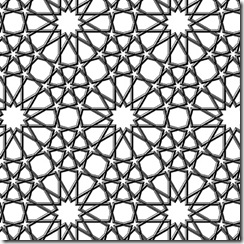
Taprats is a Java applet that implements design technique for Islamic star patterns. The technique is based largely on the work of Hankin in the early part of the twentieth century. Taprats has a library of built-in tilings that can be used to construct many famous Islamic designs. Even better, the construction of these designs is parameterized in certain ways, so you can use Taprats as a vehicle for exploration of the vast space of Islamic designs.
The following design is made using Taprats (not by me)
blog-he
You can also download it on your system from here. (If you are not sure how to use it, read the user manual from here)
  • Use a computer software, try making patterns based on hexagons, octagons and stars by manipulating the basic shapes in different ways.
Recommended software:
Adobe Illustrator or even Photoshop
Tux Paint
Drawing for Children
Microsft Paint
  • Visit a museum and see different Islamic arts, and perhaps do some of the activities suggested here
  • You can embed History very well with this theme

  • Last but not least, what is the Islamic ruling on Islamic art?
1. Islam does not forbid the art, as far as it doesn’t contain any fawaahish, and doesn’t include the drawing of animated figures. The prohibition of drawing animated objects is proved by following ahadeeth:
It is narrated on the authority of Ibn Umar (Radhiallahu Anhu) that the Prophet (Sallallahu Alaihi Wasallam) said, “Those who make pictures will be punished on the day of judgment. It will be said to them: Bring to life what you have created!”
It is narrated on the authority of Ibn Mas'ood (Radhiallahu Anhu) that the Prophet (Sallallahu Alaihi Wasallam) said, “The people who will be most severely punished on the Day of Judgment are those who make pictures (of animate objects)”.
It is narrated on the authority of Ibn Abbaas (Radiallahu Anhu) that the Prophet (Sallallahu Alaihi Wasalam) said, “Every person who creates pictures of animate objects will be in the fire of Hell. Every picture that he created will be given a life and will punish him in Jahannum
2. Like any other form of amusement, it is not lawful to indulge too much in it. When used as a tool for education, it is indeed permissible. For the purpose of recreation also it is permissible but if the engrossment is causing the person to cause delay in his/her salaah etc then caution better be observed.
3. Tell children about extravagency, its vices and prohibition. It is narrated in Bukhari:
Narrated Ash-sha'bi:
The clerk of Al-Mughira bin Shu'ba narrated, "Muawiya wrote to Al-Mughira bin Shu'ba: Write to me something which you have heard from the Prophet (p.b.u.h) ." So Al-Mughira wrote: I heard the Prophet saying, "Allah has hated for you three things:
1. Vain talks, (useless talk) that you talk too much or about others.
2. Wasting of wealth (by extravagance)
3. And asking too many questions (in disputed religious matters) or asking others for something (except in great need). (See Hadith No. 591, Vol. Ill)
Then show them the pictures of masaajid and other buildings with ornate “Islamic” decorations. (Can you see the irony? most of the “Islamic” designs are applied in totally un Islamic way) Think about the amount spent, the effort put and ask them their opinion about spending so much time and wealth on decorating masaajids and other buildings.
Personally i think that this extreme indulgence in decorating masaajids etc is one of our greatest shortcomings as an Ummah. The millions spent in the beautification of masaajid can be very well spared. The Ummah whose young are dying of hunger is spending their millions and resources in beautifying the mere buildings of house of Allaah, Who loves simplicity and has ordered his servants to practise upon it.. If the effort spent in beautifying the buildings of masaajid were rather spent in beautifying the souls of masaajid (its musallees and their Imaan) it would be worth decidedly more, and Allaah knows the best!
The arcitecture of Muslim Spain , like of AL Hamra etc, is said to be the biggest inspiration for Islamic design, yet today there are no native Spanish Muslims left because the rulers of Muslim Spain had fallen in the trap of Dunya. If you read through Spanish Muslim history, the thing that stands out is the indulgence of Muslims in finnesses and riches. They built grand domes and let the morals fall. May Allaah Swt grants this ummah the understanding aamin.
I see this unit on Islamic design as a perfect opportunity to etch in the minds of our young the evils of getting too fond of this world and its riches. May Allaah save us and all the Ummaah from this great evil aamin.
Related Posts with Thumbnails